

Customize your phone
Samsung Galaxy S26 Ultra

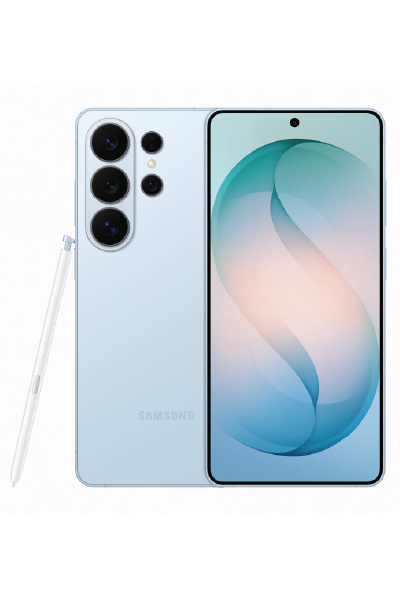
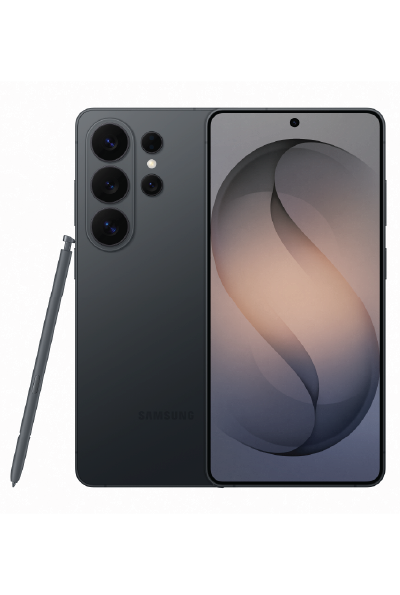
Samsung Galaxy S26 Ultra
When lights go down, your shots stay bright.
Let the night do its thing while you do yours. Nightography automatically adjusts as you shoot, keeping your videos bright, smooth and clear — no extra lighting required.
easyTab Flex® i
For 24 months
easyTab®
For 24 months

With easyTab®, you get to keep your phone at the end of your 24 month term. Your monthly easyTab® payment is determined by dividing the price of your phone into 24 equal payments.
*Taxes extra and are based on the device full retail price (minus applicable easyTab® discounts). Taxes are financed over the 24 month term.
With easyTab Flex®, you get the lowest monthly price on your phone. At the end of your 24 month term, you return your phone and get a brand new one. Want to keep your phone? No problem. Just pay off the easyTab Flex® Deferred Amount at the end of your term.
*Taxes extra and are based on the device full retail price (minus applicable easyTab® discounts, before easyTab Flex® Deferred Amount is applied). Taxes are financed over the 24 month term.
© 2026 Samsung Electronics Canada Inc. All rights reserved. Samsung and Samsung Galaxy are registered trademarks or trademarks of Samsung Electronics Co., Ltd., used with permission. Screen images simulated.
easyTab® is a device financing program which allows you to purchase your phone with equal payments over a 24 month term, on approved credit and an eligible plan. Monthly device payment varies by device selected. If you cancel or terminate your agreement early, for any purpose, your remaining device payments will become due immediately. The additional easyTab® savings off the regular price is based on 24 equal contribution payments in the amount shown, subject to change.
easyTab Flex® is a device financing program that offers you an upfront credit (the "Deferred Amount") towards the balance of your device easyTab® at time of purchase on select devices, providing you with a reduced monthly tab contribution in consideration of your agreement to return the device in Good Condition (see below for more details) at the end of your 24-month term. Requires an eligible plan and available on approved credit. If you keep your device at the end of your 24-month term you will be billed the Deferred Amount. If your account is cancelled prior to the end of your 24-month term or your device is not returned in Good Condition at the end of your term, your account will be billed the Deferred Amount. Taxes extra and are based on the device full retail price minus applicable easyTab® discount, before easyTab Flex® Deferred Amount is applied. Taxes are financed over the 24-month term.
To return your easyTab Flex® device you must go to an Eastlink retail location where the device will be inspected to determine if it is in Good Condition. Good Condition means the device:
• powers on, holds a charge and navigates to the home screen
• is free from liquid damage
• is free from apparent physical damage (e.g., bending, cracks, severe scratches, chips, or punctures to any part of the device, including the screen, back glass, frame or cameras)
• display is fully functional and free of defects such as visible burn-in, ghost images or dead pixels
• cameras, speakers, buttons, ports & microphone function properly
• there are no missing components (e.g., buttons, keys, SIM/media tray, included stylus, battery cover)
• all activation/security locks for the device are turned off and no longer linked to your associated cloud account, such as “Find my iPhone” (for Apple devices) and “Activation Lock Protection” (for Android devices)
• any PIN/password, facial recognition or fingerprint lock has been removed, data has been removed, and the device has been factory reset
Eastlink collects the device on behalf of Assurant Services Canada Inc. (ASCI) and does not take ownership. ASCI and its subsidiaries and affiliates carry on business in Canada under the name Assurant. Assurant is a registered trademark of Assurant, Inc.

Meet Galaxy S26 Ultra, an AI phone featuring a customized processor that tranforms your experience, our brightest camera system and the world's first built-in Privacy Display on mobile - all in the palm of your hand to enhance your everyday life.
MEET YOUR NEW AI PHONE
Refined design

Introducing a new glass camera island that flows seamlessly into the device as part of a more refined design.
Privacy Display

With built-in Privacy Display, decide whether to hide your whole screen, specific apps, incoming notifications or PINs, Patterns and passwords when accessing Settings, Lock Screen and Secure Folder.
Privacy Display feature controls the screen's viewing angle to limit peripheral vision and must be activated in Settings. Activation for specific apps also available through the Settings. Some changes in image quality may occur outside the viewing angle. Some information may still be visible to others depending on the viewing environment, such as angle or brightness.
Performance

Customized Image Enhancer. Our customized processor is built with improved NPU, GPU and CPU for enhanced AI performance.
AP performance improvements shown compared to Galaxy S25 Ultra. Actual performance will depend on user environment, conditions and pre-installed software and applications.
Nightography Video

Close up of Galaxy S26 Ultra's rear camera is seen. Zooming inside the lens, it transforms to a video being shot in low light. Thanks to Nightography, details remain vivid and clear.
Results may vary depending on light condition and/or shooting conditions including multiple subjects, being out of focus or moving subjects.
Photo Assist

Get quick and easy photo editing by writing prompts using natural language, and Galaxy AI will take care of the rest.
Photo Assist may require a network connection and Samsung Account login. Service availability may vary by country, language or device model. Photo Assist may result in a resized photo. A visible watermark is overlaid on the image output upon saving in order to indicate that the image is generated by AI. The accuracy and reliability of the generated output is not guaranteed.
Key specs at a glance

Our customized processor is built with improved NPU, GPU and CPU for enhanced AI performance.
AP performance improvements shown compared to Galaxy S25 Ultra. Actual performance will depend on user environment, conditions and pre-installed software and applications. Weight may vary by country or region. Compared to previous models. Based on Samsung internal lab test conditions with pre-release version of given model connected to earphone via Bluetooth under default settings over LTE. Estimated against battery capacity and measured current over battery power consumption during video playback (video file resolution 720 p, saved on device) on the main screen. Actual video playback time may vary by network connection, settings, video file format, screen brightness, battery condition and many other factors. S26 Ultra, S26+, and S26 runtime compared with S25 Ultra, S25+, and S25 respectively under the same conditions detailed above.
DESIGN
See the details up close


Armor Aluminum frame does not include volume and side keys, SIM tray or camera lens barrel. Corning® Gorilla® Armor 2 is applied to the front of the device and Corning® Gorilla® Glass Victus® 2 is applied to the rear.

Armor Aluminum frame does not include volume and side keys, SIM tray or camera lens barrel. Corning® Gorilla® Armor 2 is applied to the front of the device and Corning® Gorilla® Glass Victus® 2 is applied to the rear.

See how thin and light Galaxy S26 Ultra is

Measured diagonally, Galaxy S26's screen size is 6.3” in the full rectangle and 6.1” accounting for the rounded corners, Galaxy S26+'s screen size is 6.7” in the full rectangle and 6.5” accounting for the rounded corners, and Galaxy S26 Ultra's screen size is 6.9” in the full rectangle and 6.7” accounting for the rounded corners; actual viewable area is less due to the rounded corners and camera hole.
PERFORMANCE
Our most powerful processor, customized for Galaxy

Meet the latest and most powerful processor ever on Galaxy. It's engineered to unlock the full potential of Galaxy AI for heavy multitaskers, powering a customized image enhancer that sharpens and smooths visuals across apps and content in real time. Plus, a 39% boost to the advanced NPU and 24% greater graphics processing handles the most demanding titles for mobile gamers
Privacy Display feature controls the screen's viewing angle to limit peripheral vision and must be activated in Settings. Activation for specific apps also available through the Settings. Some changes in image quality may occur outside the viewing angle. Some information may still be visible to others depending on the viewing environment, such as angle or brightness.

The world'd first Privacy Display on mobile
Meet your built-in privacy screen, only on Galaxy S26 Ultra. Just manually switch on, and Privacy Display will use innovative technology to protect your private information by hiding your full screen from other people's view. Or, you can choose what you want to hide such as certain apps, all incoming notifications or for when you need to enter PINs and passwords in Settings, Lock Screen or Secure Folder.


AP performance improvements shown compared to Galaxy S25 Ultra. Actual performance will depend on user environment, conditions and pre-installed software and applications.

Privacy Display feature controls the screen's viewing angle to limit peripheral vision and must be activated in Settings. Activation for specific apps also available through the Settings. Some changes in image quality may occur outside the viewing angle. Some information may still be visible to others depending on the viewing environment, such as angle or brightness.
Play it cool with our largest Vapor Chamber ever

Galaxy S26 Ultra is built for demanding sessions, whether you're running heavy-spec games or using Galaxy AI, thanks to Snapdragon® 8 Elite Gen 5 for Galaxy and advanced thermal management. Vapor Chamber's new design dissipates heat faster and more efficiently than ever before.
Alongside the tailored thermal interface material (TIM), the advanced cooling system works within the device to deliver 21% greater thermal performance. Vulkan-optimized games also effectively render light and shadows for Galaxy S26 Ultra while ray tracing creates 3D images for more realistic colors and reflections.


AP performance improvements shown compared to Galaxy S25 Ultra. Actual performance will depend on user environment, conditions and pre-installed software and applications. Snapdragon branded products are products of Qualcomm Technologies, Inc. and/or its subsidiaries. Snapdragon is a trademark or registered trademark of Qualcomm Incorporated.

See how long Galaxy S26 Ultra's battery lasts


CAMERA
Clear and bright at night

Galaxy S26 Ultra sets a new benchmark for Nightography with wider apertures and noise reduction that deliver clear and detailed videos in low-light environments. The Wide camera now features a 47% brighter aperture that opens to F1.4, while the Telephoto camera opens to F2.9 for 37% improved brightness.
Compared to previous models. Based on Samsung internal lab test conditions with pre-release version of given model connected to earphone via Bluetooth under default settings over LTE. Estimated against battery capacity and measured current over battery power consumption during video playback (video file resolution 720 p, saved on device) on the main screen. Actual video playback time may vary by network connection, settings, video file format, screen brightness, battery condition and many other factors. S26 Ultra, S26+, and S26 runtime compared with S25 Ultra, S25+, and S25 respectively under the same conditions detailed above. Actual battery life varies by network environment, features and apps used, frequency of calls and messages, the number of times charged, and many other factors. Estimated against the average usage profile compiled by UX Connect Research. Independently assessed by UX Connect Research between 2026.1.8-2026.1.30 in US and UK with pre-release versions of SM-S942, SM-S947 and SM-S948 under default setting using LTE and 5G Sub6 networks. NOT tested under 5G mmWave network.
Clearer moments with Nightography photo

Storage options and availability may vary by carrier, country or region. Actual storage availability may vary depending on pre-installed software.
Check the specs on our best camera system

Results may vary depending on light condition and/or shooting conditions including multiple subjects, being out of focus or moving subjects.

See the difference in camera specs

Super Steady Video. Even on the go

Super Steady's Horizontal Lock feature combines expanded optical angles with gyro and acceleration sensors to recognize the direction of gravity and keep your shots level, even if you rotate a full 360°. Whether you're on rocky trails or chasing your fastest finish, get smoother videos every time.


Super Steady is on by default and can be turned off in the camera settings. Results may vary depending on editing method and/or shooting conditions.


GALAXY AI
Photo Assist. Studio-level edits. Built in.

Get quick and easy photo editing with just a few words and AI. Add objects, such as accessories on photos of your pet by naturally describing the edits you wish to make, and Galaxy AI will realize your vision in minutes.
Optical quality zoom is enabled by the Adaptive Pixel sensor. 3x and 5x distances are optical zoom. 2x and 10x distances are optical quality zoom. 100x Space Zoom includes 10x optical quality zoom and 100x digital zoom with Super Resolution technology. Zoom distances past 10x zoom may express some image deterioration. AI Zoom is applied to distances between digital set zoom lengths. Accuracy of results is not guaranteed.

Real-time suggestions when you need it


Creative Studio feature requires a network connection and Samsung Account login. Service availability may vary by country, language or device model. The accuracy and reliability of the generated output is not guaranteed. Sticker sets only compatible with Samsung keyboard and can only be shared via Quick Share feature with other Galaxy devices that have One UI 5.0 or later installed and Quick Share app version 13.8.50.x or later.

Now Nudge feature requires a Samsung Account login. Available functions and features may vary by country, region and language. Text message prompts available with certain third party messaging apps may vary. Share photos in Now Nudge works by analyzing available image content. Accuracy of results is not guaranteed. Now Nudge and its permissions must be turned on in your phone's settings. Users must accept Samsung's privacy policy and terms of use prior to using this feature. Now Brief feature requires Samsung Account login. Service availability may vary by country, language, device model, apps. Some features may require a network connection. The description of photos provided by moments may not align with the user's intent. Notifications for dog walking require SmartTag2 and Pet Care in SmartThings to be activated. SmartTag2 sold separately. Notifications must be switched on to be used as the recalled data. Recalled data available from supported app notifications, Messages, Gmail and Samsung Wallet and data collected from Gmail is only applicable if the user consents to Personal Data Intelligent's Gmail read permission. Recalled data for reservation details only available from reservation confirmation messages.
ONE UI 8.5
Your Galaxy, your way

Built to adapt to you, One UI 8.5 personalizes your Galaxy based on how you use it day-to-day. Designed to be simple and intuitive, contextual reminders from Now Brief and intelligent suggestions from all-new Now Nudge and AI Select make daily tasks easier in just a tap.
Compare your device

Why switch to Galaxy
Switching made simple
Imagine where our most powerful devices could take you. Switch to Galaxy and discover a world where all of your technology works together seamlessly, keeping you connected and in control.

Bixby service availability requires Samsung Account login and data connection. Available functions and features may vary by country, region, and language. Bixby only recognizes certain accents and dialects of English (UK), English (US), English (India), French (France), German (Germany), Italian (Italy), Japanese (Japan), Korean (South Korea), Mandarin Chinese (China), Spanish (Spain), Portuguese (Brazil) and Spanish (Latin America). Other supported languages may be added in the future. Not all accents, dialects, and expressions may be recognized, and actual performance may vary depending on pronunciation, voice level, and the surrounding environment. Use of Bixby may be limited in certain situations such as when recording media (Video/Game/Voice), during calls, Maximum Power Saving mode, Emergency mode and Samsung Kids. Service availability may vary by country/service provider/language/device model/OS version. Bixby controls selected apps, other apps to be supported. To control SmartThings enabled devices with Bixby, first connect the devices to the SmartThings app. For more information, visit the SmartThings website (www.samsung.com/smartthings).


The Personal Data Engine functions under the condition that the Personal Data Intelligence menu is on. Analyzed data will be deleted once the Personal Data Intelligence menu is turned off. Personal Data Engine recognizes select languages and certain accents/dialects, including but not limited to Arabic, (Simplified) Chinese, Dutch, English, French, German, Hindi, Indonesian, Italian, Japanese, Korean, Polish, Portuguese, Romanian, Russian, Spanish, Swedish, Thai, Turkish, and Vietnamese. Personal Data Engine currently analyzes Samsung native applications and supported app notifications.

ACCESSORIES
Show your magnetic style
Our super-fast wireless chargers, alongside Magnet Cases, keep your phone in an optimal charging position.


Discover what benefits you can get


